Swagger Contract Testing On-Premises Architecture
System architecture
Warning
Swagger Contract Testing On-Premises 1.x.x is now deprecated and no longer supported as of March 11, 2026. This version no longer receives updates, including security updates. We recommend upgrading to a supported version 2.x as soon as possible.
Minimum requirements
An application server capable of running Docker
PostgreSQL database
SAML IDP for SSO
Swagger Contract Testing On-Premises license file
Recommended architecture
Deploy to a service designed for Docker container orchestration (ECS, Fargate, Kubernetes, etc.)
Example AWS deployment using ECS
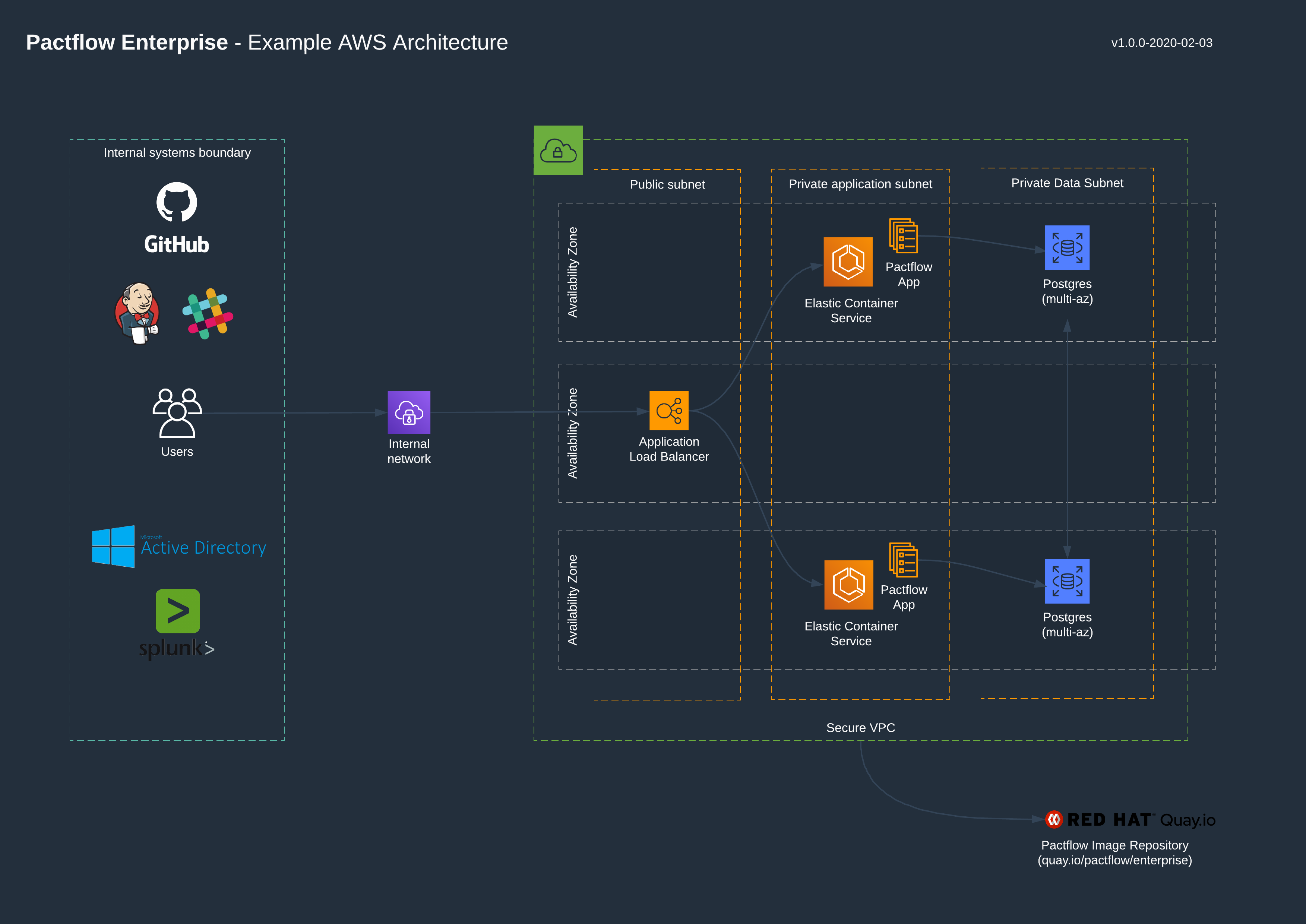
Internal architecture
The Contract Testing On-Premises application is distributed as a Docker image. It is based on the open source Pact Broker, which is a Ruby application.
Application user requirements
The Contract Testing On-Premises application does not need any elevated privileges to run. It runs under the user app:app.
Application port
The Contract Testing On-Premises application runs on port 9292 by default. This can be configured by setting the PACTFLOW_HTTP_PORT environment variable.
Healthcheck endpoint
A healthcheck endpoint for use by a Docker container management service is available at http://<HOST>/diagnostic/status/heartbeat. No authentication is required. This endpoint does not make a connection to the database.
If the healthcheck is running from inside the container, make sure to use the port defined in the environment variable $PACTFLOW_HTTP_PORT, which defaults to 9292. You can use wget to perform the healthcheck request.
An example healthcheck configuration for Docker Compose:
healthcheck:
  test: ["CMD", "wget", "-nv", "-t1", "--spider", "http://localhost:9292/diagnostic/status/heartbeat"]
  interval: 30s
  timeout: 10s
  retries: 3
To check the connection to the database, use the endpoint /diagnostic/status/dependencies. This endpoint should not be used by Docker container managment services, as unrelated database issues might cause the Docker container to churn.
License file
Contract Testing On-Premises requires a license file to run. Contact us if you have not received one when your account was setup. See the section on licenses for installation instructions.